Local accessibility assistant
BlindHelper hears the current page and helps you act on it
BlindHelper is a browser extension that reads the page you are on in short, spoken stages: the visible layout, headings, links and buttons, forms, text, and every image with its alt text. Ask a question, tell it to pause or resume, or ask it to open a named link. The page and screenshot stay in your browser; the Bonsai model runs locally.


Store links are placeholders while the Chrome Web Store and Firefox Add-ons listings are prepared. The extension is separate from this website and has no WordPress dependency at runtime.
What BlindHelper does
Reads only the current page
It does not crawl links or treat a linked page as analysed content. You stay in control of where you are.
Uses short serial stages
Instead of one oversized page dump, BlindHelper asks the model one bounded question at a time. Each stage starts with fresh model state, so earlier answers cannot pile up in the context window.
Speaks as it goes
Each finished stage is spoken with your browser voices. Choose English or one of 36 other languages; non-English speech translates the generated text clause by clause.
Keeps actions deterministic
Focus, scroll and safe link activation are checked against the page. A model cannot invent a link target or bypass the content script's safety checks.
The page-reading stages
- Visible layout – a masked screenshot gives the overall grouping and where the main content sits.
- Headings – the main heading and sections from
h1toh4. - Links and buttons – the main actions and navigation names, without sending URLs to the model.
- Forms – field types and purposes, with no values included.
- Page text – a short summary of the readable text.
- Images – one image at a time, with the page's alt text explicitly included in the description.
Only categories that exist on the page run. Pause stops at the next safe point and keeps the remaining stages. Resume restarts the interrupted stage with fresh state. Stop, cancel and exit end the reading without resume.
Commands and controls
Reading controls
pause– stop after the current safe stage; keep the rest queued.resume– restart the interrupted stage.stop,cancel,exit– cancel page reading, model work and speech.help– open the help section and speak a short help message.
Link commands
open link Contact or follow link Contact asks BlindHelper to read a fresh copy of the current page and activate exactly one matching link.
If no link matches, or more than one link could match, it does not navigate. It tells you what it found instead.
Visible Pause, Resume and Stop buttons are provided because speech recognition is not available or reliable in every Firefox configuration.
Local models
BlindHelper uses the same local Bonsai 2B and Bonsai 4B models as Speak Image. Both run with WebGPU and download from Hugging Face on first use. The page and the extension keep separate browser caches, so the same model may be downloaded once for each.
- Bonsai 2B – the practical phone choice.
- Bonsai 4B – desktop-class. Too heavy for most phones; use it where memory and GPU headroom allow.
The model is not ready until it reports loaded for the currently selected settings. Scan, overview and question controls stay disabled until then.
Settings and controls
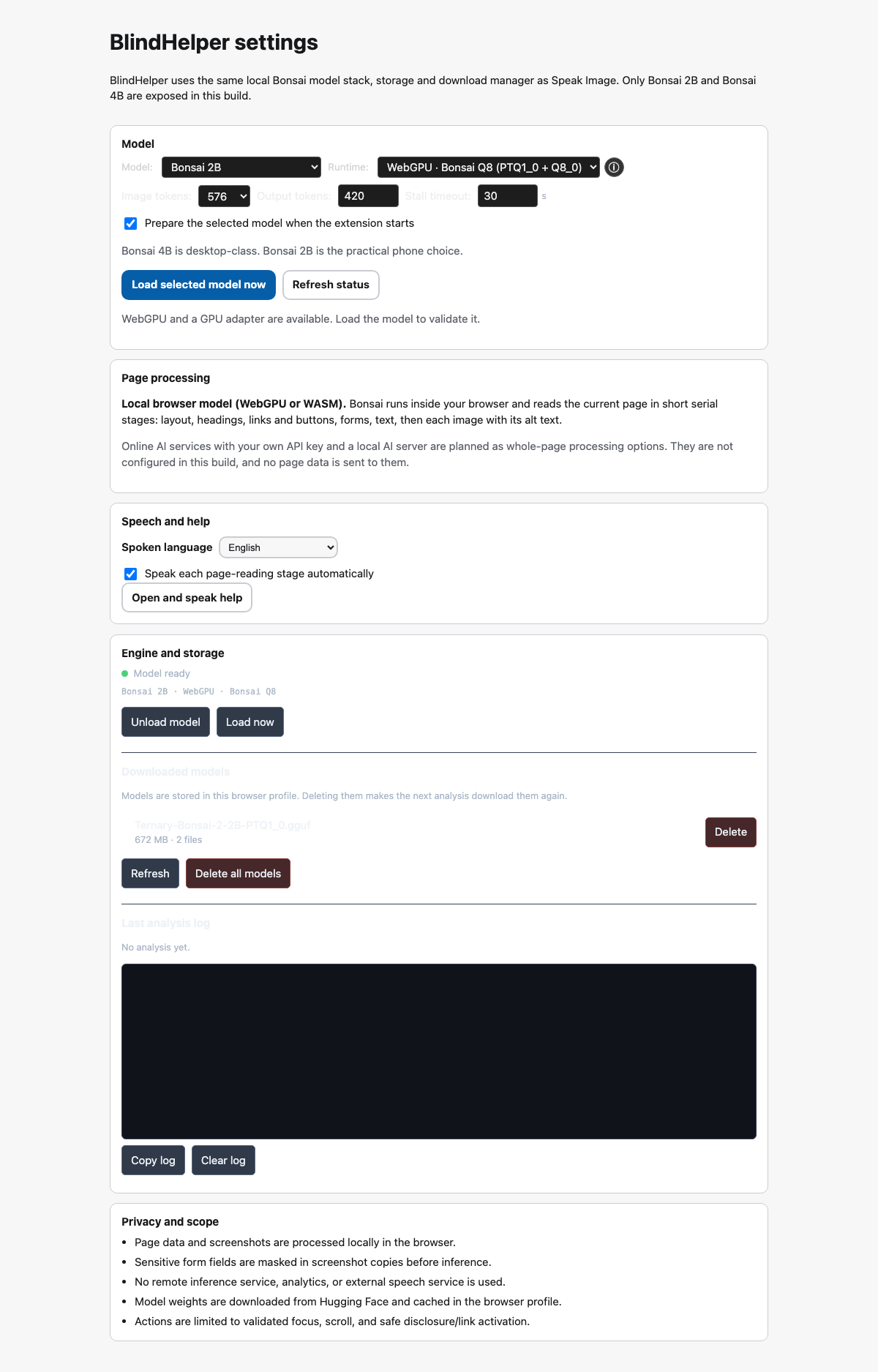
The settings page uses the shared Speak Image model controls: model, runtime, image tokens, output tokens, stall timeout, live engine status, downloaded-model management and the last-analysis log. Its page-processing section records that this build uses the local browser model in short serial stages.
Online AI services with your own API key and a local AI server are planned as whole-page processing options. They are not configured in this build, and no page data is sent to them.
Privacy
- Page text, screenshots and answers are processed locally by the selected Bonsai model.
- Sensitive form fields are masked in screenshot copies before inference.
- No remote inference service, analytics or external speech service is used.
- Non-English speech sends only the generated text to this site's translation endpoint; images are not sent.
- Model weights are downloaded from Hugging Face and stored in the browser profile or extension storage.
Frequently asked questions
Does BlindHelper follow every link on the page?
No. It reads the current page only. The explicit open link and follow link commands read the current page again and activate one validated link; they do not recursively read linked pages.
Why does it read the page in several stages?
A small local model has a limited context window. Splitting the page into bounded stages keeps each request inside that window and makes the spoken result start sooner.
Does it need a cloud account?
No. There is no sign-up, API key or remote inference. The first model download is the only network step for inference; non-English speech also requests text translation from this site.
Can I use it without speech?
Yes. Turn off auto-speak and the staged overview still appears in the sidebar. The Pause, Resume and Stop controls remain available.
Is the website page required for the extension?
No. The extension is standalone. This page is only the download and help page.